Field note ·
The tools in a newsroom, by category, and where each fits in SOM
Newsroom systems, wires, graphics, automation, prompters, media management, web publishing, verification, AI and dashboards: what each does and how it meets the Story Object Model.
A modern newsroom runs on a dozen kinds of software, usually from as many makers. A newsroom system plans the story, a graphics engine builds its lower thirds, automation runs it on air, a web CMS publishes it, and AI tools transcribe, match and check along the way. Each kind of tool is good at its own job. The hard part is that they rarely share what they know about the story. The Story Object Model (SOM) gives them one story to share. This article goes through the categories of newsroom tools, names a few examples of each, says briefly what they are used for, and shows where each category fits in SOM 1.0.
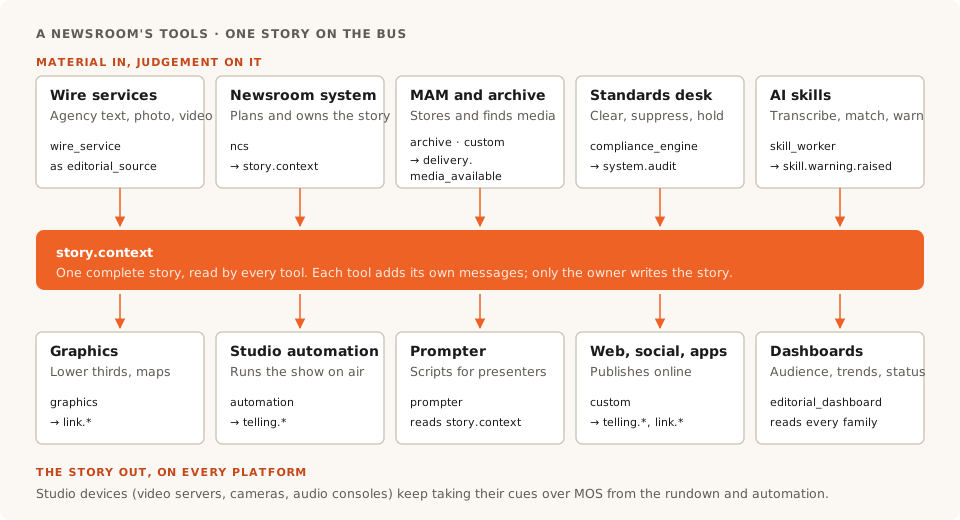
↔ Swipe to see the whole diagram
The products named below are examples, listed in alphabetical order, to make each category concrete. They are not a ranking or a recommendation, and naming a product says nothing about whether it supports SOM. See about the products named here.
How a tool meets SOM
Every SOM message says which kind of system sent it, in the envelope's originating_system.system_type. SOM 1.0 has fourteen values: ncs, mos_device, graphics, automation, wire_service, ai_agent, compliance_engine, editorial_dashboard, archive, prompter, camera, audio, skill_worker and custom. They are the closest thing SOM has to a map of the newsroom's tools.
Two rules shape how every category fits:
- One owner per story. The system that owns the story, usually the newsroom system, mints it and publishes its complete state as
story.context; other tools read it. - Everyone else adds their own messages. A graphics engine commits a graphic with
link.committed, automation reports that a story went to air withtelling.started, a media store announces new material withdelivery.media_available, an AI skill raisesskill.warning.raised. The owner folds what matters into its next snapshot.
Newsroom and planning systems
What they do. The newsroom computer system (NRCS, or NCS) is where journalists write stories and scripts, and producers build and time the rundowns for each show. Planning tools keep the diary of expected events and coordinate who covers what. Many products now do both, and publish to the web and social from the same place.
Examples.
- AP ENPS (The Associated Press): planning, script writing and broadcast rundowns.
- CGI OpenMedia (CGI): newsroom system covering wire search, planning, scripting, rundowns and playout control.
- Indigo | Editorial, formerly Inception (Ross Video): a browser-based newsroom system publishing to broadcast, web and social.
- MediaCentral | Newsroom Management, formerly iNEWS (Avid): story writing and live rundowns.
- Octopus (Octopus Newsroom): a story-centred newsroom and rundown system with mobile reporting apps.
- Saga, formerly Dina (Fonn Group): a browser-based newsroom for planning, rundowns and publishing to many platforms.
- Wolftech News (Avid, since 2024): cloud planning of stories, crews, equipment and publishing.
In SOM. system_type ncs. The newsroom system is usually the story's owner: it publishes story.context and receives everything the other tools say about the story, from skill warnings to tellings. Its rundowns are one view of the story, not the story itself.
Wire services
What they do. News agencies send a constant stream of text, photos, video and data. Newsrooms receive it through agency platforms and APIs, and most of it never becomes a story of their own. Agencies and newsrooms describe news items with IPTC standards: NewsML-G2 in XML and ninjs in JSON.
Examples. AFP (the AFP API), AP (the AP Media API), dpa (dpa-digitalwires) and Reuters (Reuters Connect).
In SOM. A wire item a newsroom picks up is recorded in the story as an editorial_source, with source_type WIRE, the provider, a credibility level and when it was received. SOM 1.0 has a wire_service system type, but no message family of its own for wire items: wires feed the story, and SOM does not replace their own formats.
Broadcast graphics
What they do. Graphics systems build and play out lower thirds, maps, full-frame graphics and tickers. Journalists fill in templates from the newsroom system; operators or automation play them on air.
Examples.
- CasparCG Server (open source): free software that plays out graphics, audio and video.
- PRIME (Chyron): a real-time graphics platform for news, sports and live events.
- Singular.live (Singular.live): live graphics designed and controlled from a web browser.
- Viz Pilot Edge and Viz Trio (Vizrt): templates for journalists, and on-air graphics playlists for operators.
- XPression (Ross Video): real-time motion graphics, with tools for newsroom templates.
In SOM. system_type graphics. A graphic is an asset in the story (GRAPHIC, MAP, LOWER_THIRD). The graphics system reads story.context, and publishes link.committed when it commits a graphic to an output, or link.withdrawn when it pulls one. It can read the story's editorial gates too, so a held figure can stay off screen.
Studio automation and playout
What they do. Automation turns a rundown into timed commands for the switcher, cameras, servers, graphics and audio, so a small team can run a live show. Playout systems put channels on air.
Examples.
- Cinegy Air (Cinegy): software playout and channel automation.
- Cuez Automator (Cuez): rundown-driven automation, including devices that don't speak MOS.
- Ignite and AMPP Automation (Grass Valley): control-room automation.
- OverDrive (Ross Video): automated production control from a rundown.
- Sofie (open source): web-based studio automation.
- Viz Mosart (Vizrt): studio automation from newsroom rundowns.
In SOM. system_type automation. Automation reads the story and the links committed to its show, and reports what actually went to air with telling.started and telling.ended. Whether something aired is read from its tellings, never stored on the asset.
Prompters
What they do. Prompters show presenters their scripts, updated live from the newsroom system as the rundown changes.
Examples. Autocue (Videndum), Autoscript WinPlus-IP News (Videndum) and CueiT (CueScript).
In SOM. system_type prompter. A prompter reads: the script is a SCRIPT asset of the story. It has nothing it needs to publish.
Studio devices: servers, camera robotics and audio
What they do. Video servers record feeds and play clips live. Robotic heads and pedestals move studio cameras. Audio consoles mix the show.
Examples. Servers: Avid | Stream IO (Avid), GV I/O (Grass Valley), Tria+ (Ross Video) and XS-VIA (EVS). Camera robotics: Furio and CamBot (Ross Video), T-Motion (EVS, which includes Telemetrics) and Vinten (Videndum). Audio: Calrec (Audiotonix) and Lawo (Lawo).
In SOM. SOM 1.0 has mos_device, camera and audio system types, but these devices mostly take their cues from the rundown and automation, and nothing about that has to change. Many of the newsroom systems, graphics, automation and prompter products named in this article say on their own pages that they work with MOS, the protocol that carries rundowns to studio devices. SOM carries the story around the newsroom; MOS keeps cueing the gallery. Our comparison of MOS and SOM explains the difference.
Media asset management and archive
What they do. A media asset management system (MAM) ingests, stores, indexes and finds footage, lets people cut clips in a browser, and hands finished media to playout and the web. The archive keeps it for years.
Examples.
- Dalet Flex (Dalet): managing, packaging and delivering content.
- Iconik (Backlight): cloud media management with review and collaboration.
- MediaCentral (Avid): ingest, asset management, browser editing and archive access.
- Mimir (Fonn Group): cloud media search, browser clipping and publishing.
- Perfect Memory (Perfect Memory): asset management built on semantic metadata.
- Viz One (Vizrt): asset management with search, metadata and archive access.
In SOM. system_type archive, or custom (SOM 1.0 has no value for a MAM). When material lands, the MAM publishes delivery.media_available. The media never travels the bus: the story points at it by reference and time range.
Web, social and app publishing
What they do. A digital CMS is where the web desk writes, edits and publishes articles, and sends them to apps, social platforms and partners.
Examples.
- Arc XP (Arc XP): content management, delivery and subscriptions for publishers.
- Brightspot (Brightspot): an enterprise CMS.
- Cue (Stibo DX): a CMS for multichannel newsrooms.
- Glide (Glide Publishing Platform): a headless CMS for media, sports and entertainment publishers.
- WordPress VIP (WPVIP): managed enterprise WordPress.
In SOM. system_type custom. The CMS reads the same story.context as the bulletin, publishes link.committed when an asset is placed on a page, and telling.started when it goes live. A correction made once in the story reaches the web as well as the air.
Verification, provenance and standards
What they do. Verification tools help journalists check images, video and claims. Provenance standards attach a tamper-evident record of where media came from. Standards and legal desks decide what may go out, often with tools built in-house.
Examples.
- AP Verify (The Associated Press): a dashboard of verification tools for photos, video and text.
- C2PA Content Credentials (the Coalition for Content Provenance and Authenticity): an open standard for media origin and edit history.
- Fact Check Explorer (Google): a search engine for published fact-checks.
- Full Fact AI (Full Fact): software that helps fact-checkers find and track claims.
- InVID-WeVerify verification plugin (AFP Medialab and European research partners): a free browser extension for checking images and video.
In SOM. A check becomes part of the story: a fact check or a detection is an assertion with a review_state, an asset records its content credential in authenticity_credential, and an editorial gate holds an asset until it is approved. A standards desk tool uses system_type compliance_engine and records clearances and suppressions as system.audit.
AI transcription, indexing and skills
What they do. AI tools turn speech into text, index video by what is in it, match loose footage to stories, and check copy against a newsroom's rules.
Examples.
- AssemblyAI (AssemblyAI): speech-to-text APIs.
- Moments Lab, formerly Newsbridge (Moments Lab): AI indexing that makes video searchable by moment.
- Sonix (Sonix): automated transcription, translation and subtitles.
- Speechmatics (Speechmatics): speech-to-text APIs for developers.
- Trint (Trint): AI transcription and editing for newsrooms.
- Whisper (OpenAI, open source): a general-purpose speech recognition model.
In SOM. system_type ai_agent, or skill_worker for a skill executor. A transcript is a TRANSCRIPT asset whose provenance says it was authored by a model, and a match is an assertion waiting for a person's review. A skill that spots a problem publishes skill.warning.raised with a severity of hold, flag or inform. It never changes the story itself: the owner and the editors decide.
Editorial dashboards and audience tools
What they do. Dashboards show editors what is happening: how stories perform, what people are searching for, what is spreading on social platforms, and early signs of breaking events.
Examples.
- Chartbeat (Chartbeat): real-time audience dashboards.
- Dataminr for News (Dataminr): real-time alerts on early signs of breaking events.
- Google Trends (Google): what people search for, over time and by region.
- NewsWhip (NewsWhip): how stories spread across the web and social platforms.
- Parse.ly (WPVIP): content analytics.
In SOM. system_type editorial_dashboard. A dashboard is mostly a reader: from the bus it can show every story's priority, gates, warnings and tellings in one place. An alert that leads to a story can be recorded as one of its sources.
What doesn't change
- Each tool keeps its job. SOM doesn't replace the newsroom system, the graphics engine or the CMS. It lets them share the state of each story.
- SOM doesn't pick vendors. On a SOM bus, any tool that can send and read JSON over HTTPS can take part, directly or through an adapter.
- Device control stays where it is. MOS keeps cueing studio devices from the rundown.
Questions
What software does a TV newsroom use?
Typically a newsroom computer system for stories and rundowns, a planning tool, broadcast graphics, studio automation, prompters, video servers, a media asset management system, a web CMS, and a growing set of verification, AI and audience tools. Most of them come from different makers.
What is an NRCS?
A newsroom computer system (NRCS, or NCS) is the software where journalists write stories and scripts and producers build the rundown for each show. In SOM it is usually the story's owner, publishing its story.context.
Does a tool have to support SOM to work with it?
Not natively. A tool without SOM support can take part through an adapter that turns its events into SOM messages and back. Someone has to build and own that adapter: the newsroom, the maker or a third party.
Which products support SOM?
Ask each maker. This article names products to illustrate categories, and makes no claim about whether any of them supports SOM.
Does SOM replace MOS?
No. MOS carries rundowns to studio devices; SOM carries the story between the newsroom's systems. They work side by side.
What is the system_type in SOM?
A field in every SOM message's envelope that says which kind of system sent it. SOM 1.0 has fourteen values, from ncs and graphics to ai_agent and custom.
About the products named here
Product and company names in this article are trademarks or registered trademarks of their owners. They are used only to identify the products, as examples of a category. RND Solutions is not affiliated with, endorsed by or sponsored by any of these companies, and naming a product is not an endorsement of it. The examples are listed alphabetically within each category, and the lists are not complete. Naming a product does not mean it supports SOM or has been tested on a SOM bus. Descriptions are our own summaries of each maker's public pages, checked in September 2026. Makers who would like a description corrected can reach us through rnd-solutions.net.
Sources
- The Story Object Model specification: the 1.0 JSON Schemas (envelope
system_type,story.contextassets, provenance, assertions andauthenticity_credential) - IPTC NewsML-G2 and IPTC ninjs
- Newsroom systems: AP solutions, CGI OpenMedia, Ross Indigo | Editorial, Avid MediaCentral | Newsroom Management, Octopus, Saga, Dina is now Saga, Wolftech, Avid closes acquisition of Wolftech
- Wires: AFP API, AP developer portal, dpa-digitalwires, Reuters Connect
- Graphics: CasparCG, Chyron PRIME, Singular.live, Viz Pilot Edge, Viz Trio, XPression
- Automation: Cinegy Air, Cuez Automator, Grass Valley automation, OverDrive, Sofie, Viz Mosart
- Prompters: Autocue, Autoscript WinPlus-IP News, CueScript CueiT
- Studio devices: EVS XS-VIA, Avid | Stream IO, Ross Tria+, GV I/O, Ross robotic camera systems, EVS T-Motion, Vinten, Calrec, Lawo
- Media management: Dalet Flex, Iconik, Avid MediaCentral, Mimir, Perfect Memory, Viz One
- Web publishing: Arc XP, Brightspot, Cue Content Store, Glide, WordPress VIP
- Verification: AP Verify, C2PA, Content Credentials, Fact Check Explorer, Full Fact AI, InVID-WeVerify plugin
- AI: AssemblyAI, Moments Lab, Newsbridge changes name to Moments Lab, Sonix, Speechmatics, Trint, Whisper
- Dashboards: Chartbeat, Dataminr, Google Trends, NewsWhip, Parse.ly
To see how these tools pass one story between them, read the story-centric newsroom workflow and the newsroom workflows. To discuss putting your own tool on a bus, talk to us about SOM.